How to Build an AI Messenger Sales Agent With n8n and Groq
Most business Pages either leave Facebook Messenger unanswered outside office hours, or hand every visitor the same scripted reply no matter what they actually asked. A visitor who wants to hire someone or start a real automation project gets treated exactly like someone asking a generic question, and a visitor who wants a real person instead of a bot has nowhere real to go. I built a real Messenger sales agent that answers grounded in the business's own actual service catalog, asks about the real need before ever asking for contact details, and hands a visitor who wants a human straight to a real, pre-filled WhatsApp message the moment that's genuinely what they want.
Does this sound like your business?
- Every answer is grounded in the real service catalog, never invented pricing or capabilities
- Visitors get asked about what they actually need before ever being asked for a name or email
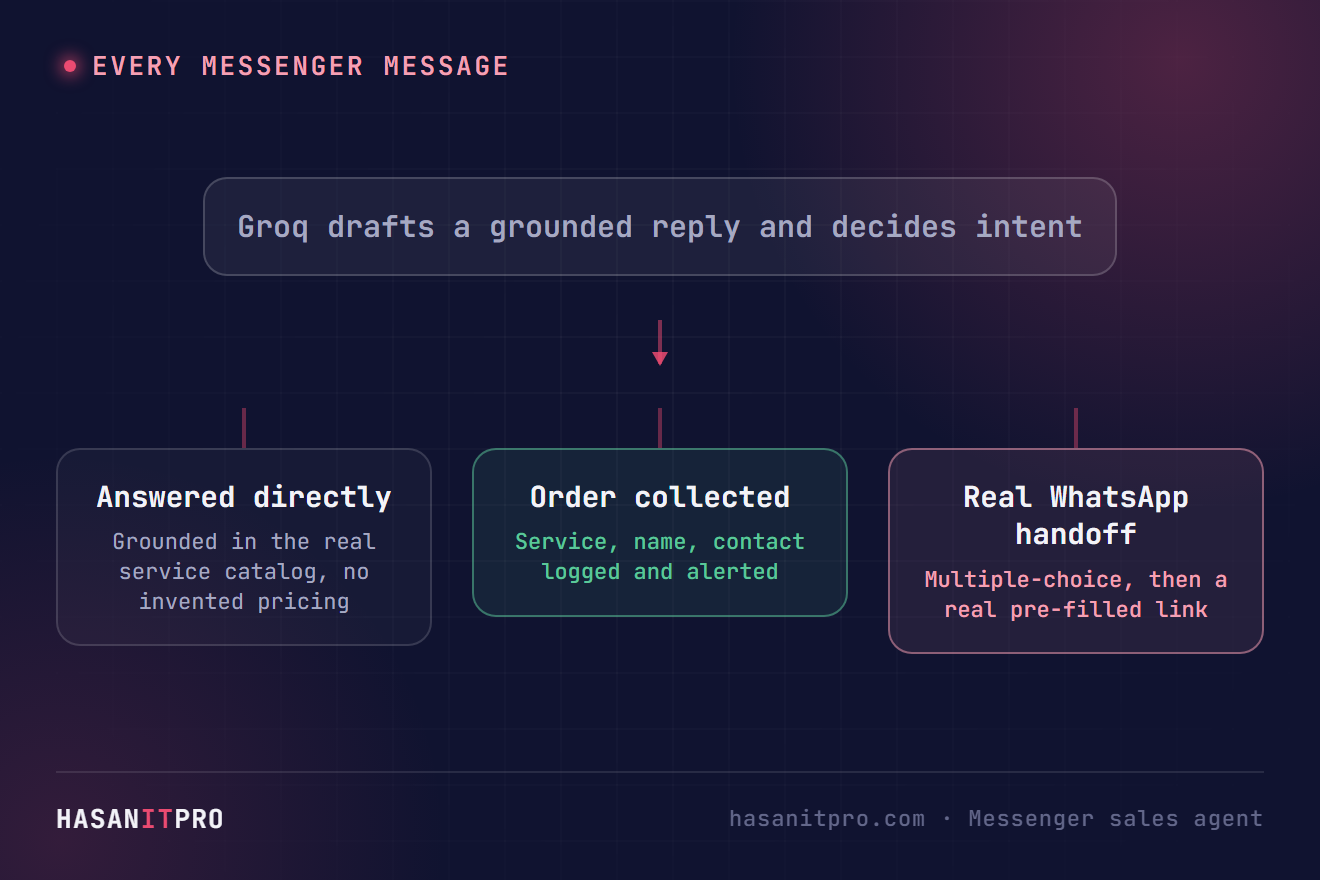
- A visitor who wants a human gets a real multiple-choice step, then a real pre-filled WhatsApp link, not a dead end
- Every completed order is logged to a real Sheet with a real alert email the moment it happens
- A safety net stops the conversation from ever repeating the same question past a fixed point
Most business Pages either leave Messenger unanswered outside office hours or bolt on a generic chatbot that recites a canned script no matter what gets typed. A visitor who actually wants to hire someone or ask about a real automation project gets the same three buttons everyone else gets. I built a real AI Messenger sales agent that answers grounded in this business’s own actual service catalog, then walks a genuinely interested visitor through a short, fixed onboarding sequence (service, timeline, current setup, a way to reach back) instead of an open-ended chat, and hands off to a real, pre-filled WhatsApp message when a visitor wants to talk to a human instead of the bot. This is exactly how it works, tested live on the real Page with real messages, not simulated data. The real, tested workflow file is free to download near the bottom of this page.
Who Is This For
This build is for service businesses, freelancers, and small agencies whose Facebook Page gets real messages nobody answers fast, or consistently.
It fits anyone who wants an AI Messenger sales agent that actually knows the real service list, never invents a price, and still gets a visitor to a real human the moment that’s genuinely what they want.
What Problem Does This Workflow Solve
- Generic Replies Ignore the Real Question: A visitor asks something specific and gets a scripted greeting back instead of an actual answer.
- Contact Details Get Asked Before the Need Does: Jumping straight to “what’s your name and email” before understanding what someone actually wants feels like a form, not a conversation.
- There’s No Real Way to Reach a Person: A visitor who wants to talk to someone, not a bot, has nowhere real to go.
How to Build an AI Messenger Sales Agent With n8n and Groq
The pipeline has one webhook doing two jobs: answering Meta’s verification handshake on GET, and handling real message events on POST. Every real event gets normalized, checked for echoes and unsupported attachments, then looked up against the visitor’s real Messenger profile before Groq drafts a grounded reply from the real service catalog and the real conversation history read back from a Sheet. The moment Groq detects genuine interest in a specific service, a separate, deterministic quick-reply sequence takes over for onboarding, described below. See my AI chat widget booking build for the QA-lint and safe-fallback pattern this one reuses, improved here to sanitize a stray style issue in place instead of discarding an otherwise good reply over it.

A Short, Fixed Onboarding Sequence Instead of Open-Ended Questions
An earlier version of this bot let Groq draft its own free-text follow-up question about what a visitor wanted to automate. Real traffic showed that never reliably converges: once a visitor named a real need, the model kept drafting a new, more specific question every turn instead of ever asking for a way to reach back, five rounds deep with no end in sight. The fix replaces that entirely with four fixed steps that cannot spiral, since none of them are drafted by the model: a Messenger quick-reply for the service, one for the timeline, one for the current setup, and a plain-text ask for an email or WhatsApp number. A quick-reply tap sends the button’s own title back as ordinary message text, so every step and everything answered so far is recoverable straight from the conversation history, with no extra database or state to manage. The visitor’s real name is read from their Messenger profile automatically, so the sequence never needs to ask for it.
Offering a Personalized Enquiry Email With One Tap
Once contact details are collected, Groq drafts a short, natural enquiry email as if the visitor wrote it themselves, grounded in their real answers from the sequence above. The bot shows that exact draft back and asks a single yes-or-no question: send it to Hasan’s personal inbox, or not. Declining never blocks anything else, the completed order and the standard internal alert email fire the moment the sequence finishes either way. Saying yes sends exactly the email the visitor already saw and approved, recovered word for word from the conversation history rather than redrafted.
Handing Off to a Real Human With a Multiple-Choice Step
A visitor asking for a human, or asking about freelance or full-time work, gets a real Messenger quick-reply menu instead of a wall of text: a genuine multiple-choice question with tappable buttons. Whichever option gets tapped builds a real WhatsApp click-to-chat link with that answer already filled in as the visitor’s own opening message, so the person on the other end has real context the moment the conversation actually starts, without the bot ever sending a message on anyone’s behalf.
Setup Guide
Prerequisites
- A free Groq API key (the openai/gpt-oss-120b model, an OpenAI-compatible API)
- A Facebook Page and a Facebook Developer App with the Messenger product added
- A Google account with Sheets access, connected through OAuth
- A hosted instance of n8n, cloud or self-hosted
Setup Steps
- Download the workflow file near the bottom of this page and import it into your n8n instance.
- Connect your credentials for Groq, the Facebook Graph API, and Google Sheets.
- Create the three Sheet tabs the workflow reads and writes: conversations, your real product/service catalog, and completed orders.
- Seed the product tab with your own real services, honestly, no invented pricing.
- Set a webhook verify token and register your app’s Messenger webhook, pointed at this workflow’s real URL.
- Activate the workflow so the production webhook goes live.
- Send a real message from your own Messenger account to your own Page, and confirm the reply actually arrives grounded in your real services.
- Walk through a full order yourself, end to end, and confirm the completed order actually lands in the Sheet with a real alert email.
How to Customize This Workflow
- Change the WhatsApp number and quick-reply options in the handoff nodes to match your own real contact channel and topics.
- Swap the AI provider if your own provider’s latency turns out unpredictable, the prompt and JSON parsing barely need to change.
- Add voice-note transcription for the one case this version doesn’t handle yet, downloading the attachment and running it through Groq Whisper before the same reply path.
- Point the Sheets log at a CRM or Airtable instead, the same append pattern works against either one.
- Change the onboarding questions and their options to match your own qualifying criteria, each is a fixed quick-reply step, so adding, removing, or reordering them is a straightforward edit, not a prompt-tuning exercise.
Related reading: running this on your own server? See how to self-host n8n. To make sure a failed step never goes unnoticed, read how to handle errors in n8n workflows. If Google Sheets keeps asking you to reconnect, here is the permanent fix for a Google credential that keeps needing to be reconnected. Building the WhatsApp version instead? See how to build a WhatsApp sales agent with n8n and Groq, and how to fix the WhatsApp access token expired error.
Need Help Customizing?
Connect with me on LinkedIn, or find more real builds on YouTube, Facebook, and Instagram.
Read the eleven steps in full below, or download the real, tested workflow file to import directly into your own n8n and add an AI Messenger sales agent to your own Page.
-
1
Handle Meta’s Webhook Verification and Real Events on One Path
One Webhook node answers Meta's GET verification handshake (echoing back hub.challenge only if hub.verify_token matches a real secret) and receives real POST message events on the same path, since Meta only allows one callback URL per Facebook App.
-
2
Normalize the Incoming Messenger Event
A Code node pulls the sender's PSID, message text, any attachment type, and whether this is a quick-reply tap, out of Meta's real webhook payload shape.
-
3
Skip Echoes, Receipts, and Unsupported Attachments
Meta echoes the bot's own sent messages back through the same webhook, replying to those would loop forever, so echoes and read/delivery receipts get skipped before anything else runs. A voice note or image with no text gets an honest "can't listen yet, please type" reply instead of reaching the LLM at all.
-
4
Look Up the Visitor’s Real Messenger Profile
A real Graph API call fetches the visitor's actual name, locale, and gender for the same PSID, logged alongside every conversation row and order so a raw PSID number is never the only way to identify who actually messaged.
-
5
Ground Every Reply in the Real Service Catalog and Conversation History
Real conversation history and the real product catalog get read back from Google Sheets every turn and built into the prompt, so the model never answers from memory or invents a service that doesn't exist.
-
6
Draft the Reply With Groq and Detect Intent
One Groq call drafts the actual reply and classifies intent as plain Q&A, wanting a human, an order in progress, or a completed order, the same technique used to detect booking intent in an earlier build, applied here to a real multi-turn sales conversation instead of a single exchange.
-
7
Ask a Short, Fixed Onboarding Sequence Instead of Open-Ended Questions
Once Groq detects genuine interest in a specific service, a deterministic quick-reply sequence takes over instead of letting the model draft its own follow-up questions: a fixed question for the service, one for the timeline, one for the current setup, and a plain-text ask for an email or WhatsApp number. None of these four are LLM-drafted, so the sequence always finishes in the same number of steps regardless of how the visitor answers. The visitor's real name is read from their Messenger profile automatically, so the sequence never needs to ask for it.
-
8
Offer a Personalized Enquiry Email With Consent
Once the onboarding sequence collects a real contact detail, a second Groq call drafts a short, natural enquiry email as if the visitor wrote it themselves, grounded in their real answers from the sequence above. The bot shows that exact draft back and asks a single yes-or-no question: send it to Hasan's personal inbox, or not. Declining never blocks anything else, the completed order and the standard internal alert email fire the moment the sequence finishes either way. Saying yes recovers the exact drafted body from the conversation history and sends it word for word, rather than redrafting it.
-
9
QA-Lint Every Reply, Sanitizing Instead of Discarding Over Style Issues
Every draft gets checked for banned filler words and a stray em dash before it ever reaches a real visitor. An em dash gets sanitized in place now instead of discarding an otherwise good, correctly grounded reply over one punctuation mark.
-
10
Log Every Turn, Complete Orders, and Alert on a Real Lead
Every turn gets logged to a real Sheet; once a service, a name, and a contact method are all actually present, the order gets logged to its own tab and a real alert email goes out immediately.
-
11
Hand Off to a Real Human With a Multiple-Choice Step and a Pre-Filled WhatsApp Link
Asking for a human, or asking about freelance or full-time work, triggers a real Messenger quick-reply menu; whichever option gets tapped builds a real wa.me link with that answer pre-filled as the visitor's own opening message, so the handoff carries real context from the first tap.
This is the real, tested n8n workflow from this tutorial, not a mockup. Tell me where to send it and it'll land in your inbox as a ready-to-import .json file.
Does this sound like your business?