How to Add an AI Chat Widget With Real Booking Using n8n and Groq
Most website chat widgets either answer nothing useful or hand a lead straight to a generic contact form that gets checked once a day. A visitor who wants to book a call has to leave the conversation, dig up a scheduling link, and hope a slot is still open. I built a real site-wide chat widget that answers visitor questions grounded in this site's own real content, then checks Google Calendar for actual open slots and books a real event on the spot, without the visitor ever leaving the chat panel.
Does this sound like your business?
- Visitor questions get grounded, honest answers instead of a generic chatbot script
- Booking a call takes one inline form, no separate scheduling page to hunt down
- Every slot offered is checked live against the real calendar, so nobody double-books
- The business owner gets a real email alert the moment a call is actually booked
- Call booking can be turned off from wp-admin without touching code, with the AI explaining why in its own words
Most website chat widgets either answer nothing useful or just forward a lead to a contact form that gets checked once a day. A visitor who actually wants to book a call has to leave the chat, hunt down a scheduling link, and hope a slot is still open. I built a real AI chat widget that answers visitor questions grounded in this site’s own real content, then checks Google Calendar for real open slots and books an actual event without the visitor ever leaving the chat panel. This is exactly how it works, tested live on this site with real bookings and real calendar events, not simulated data. The real, tested workflow file is free to download near the bottom of this page.

Who Is This For
This build is for service businesses, freelancers, and small agencies whose website gets real visitor questions with no way to answer them outside office hours.
It fits anyone who wants an AI chat widget that answers honestly and turns a genuine “can we talk” moment into an actual booked call, without a separate scheduling tool bolted on afterward.
What Problem Does This Workflow Solve
- Questions Go Unanswered Outside Office Hours: A visitor asks something reasonable at 11pm and gets nothing back until someone checks email the next morning.
- Booking Means Leaving the Conversation: A generic scheduling link breaks the flow right when a visitor is actually engaged.
- Offered Times Are Not Always Real: A static calendar embed can still show a slot that got booked five minutes ago somewhere else.
How to Build an AI Chat Widget With n8n and Groq
The pipeline has five real stages: normalize whichever request shape hit the webhook, a chat message or a booking-form submission, draft a grounded reply with Groq and decide whether the visitor wants to book, query the real calendar for open slots when they do, verify and create the actual event once they submit the form, then QA-lint the final reply and log everything to a Sheet. See my contact form auto-reply build for the QA-lint and safe-fallback pattern this one reuses, applied here to a much longer-running conversation instead of a single reply.
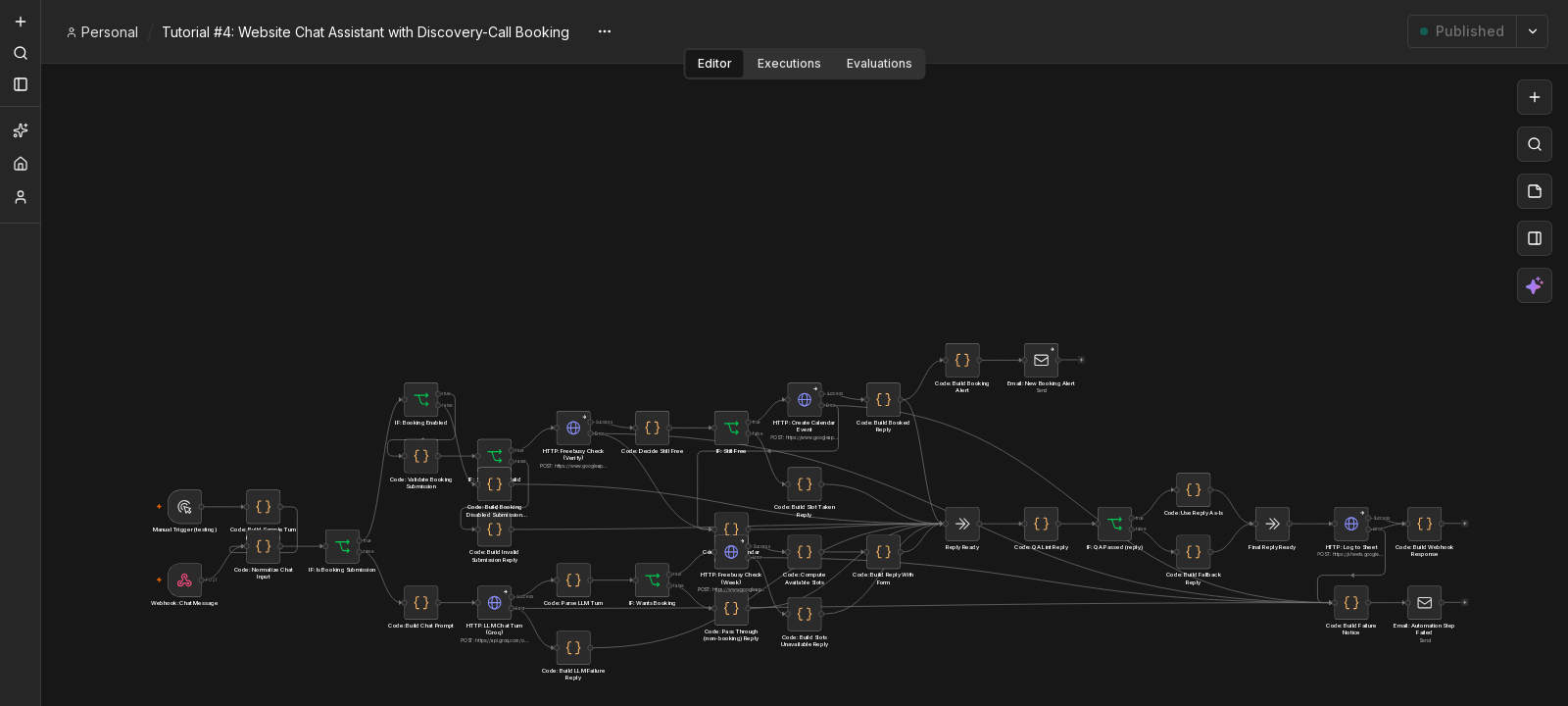
What Happens When Call Booking Is Off
Booking a real call is not always the right invitation. An admin toggle turns call booking off entirely while leaving the rest of the widget running, and when it is off the assistant explains why in its own words rather than a fixed script, then offers a real alternative instead of a dead end: a name, email, and message form opens right in the chat, no separate page, logged to the same Google Sheet a real booking uses, with a real confirmation email sent to the visitor, not just a chat bubble claiming one is coming.
A first message that is only “hi” or “hello” gets a short, exact welcome and an offer to pass the query straight through, deterministic on purpose rather than left to the model, since a first hello deserves the same reply every time. The widget itself moved out of the theme into its own small plugin along the way, with its own settings page for both toggles, so none of this depends on which theme the site happens to be running.
Setup Guide
Prerequisites
- A free Groq API key (the openai/gpt-oss-120b model, an OpenAI-compatible API)
- A Google account with Calendar and Sheets access, connected through OAuth
- A hosted instance of n8n, cloud or self-hosted
- A WordPress site (the widget ships as its own small plugin, not tied to any particular theme)
Setup Steps
- Download the workflow file near the bottom of this page and import it into your n8n instance.
- Connect your credentials for Groq, Google Calendar, and Google Sheets.
- Set your real calendar ID in the freeBusy and event-creation nodes.
- Build (or adapt) a small dedicated plugin for the widget markup, CSS, JS, and AJAX handler, pointed at your webhook, with its own settings page for the two on/off toggles below.
- Activate the plugin and the workflow so both the widget and the production webhook URL go live.
- Test with a real message asking to book a call, pick a real slot, and confirm the event actually lands on your calendar before trusting it live.
- Test with booking turned off too, confirm the assistant explains honestly, a real contact form appears in the chat, and a real confirmation email actually arrives.
How to Customize This Workflow
- Change the business-hours window in the slot-generation code if your real hours are not 9am to 5pm.
- Swap the AI provider if your own provider’s latency turns out unpredictable, the prompt and JSON parsing barely need to change.
- Turn booking off without touching code using the plugin’s own settings page, and edit the honest reason the AI gives when it is off — the contact-form fallback and the bare-greeting welcome both come along automatically.
- Point the Sheets log at a CRM or Airtable instead, the same append pattern works against either one.
- Widen the lead time past 10 days if your real booking horizon runs longer than that.
Related reading: running this on your own server? See how to self-host n8n. To make sure a failed step never goes unnoticed, read how to handle errors in n8n workflows. If Google Sheets keeps asking you to reconnect, here is the permanent fix for a Google credential that keeps needing to be reconnected. If a chat lead needs a human follow-up, see how to build a speed to lead alert system with n8n and Groq.
Need Help Customizing?
Connect with me on LinkedIn, or find more real builds on YouTube, Facebook, and Instagram.
Read the nine steps in full below, or download the real, tested workflow file to import directly into your own n8n and add an AI chat widget with real booking to your own site.
-
1
Build the Site-Wide Chat Widget First
- Add a fixed launcher button and a slide-up panel via a small plugin's own footer hook, stacked above any existing WhatsApp button on the page.
- Keep conversation history in the browser's own sessionStorage, capped to the last 8 turns, instead of a server-side session.
- Route every message through a single WordPress AJAX action that blocks on the reply, since the visitor is waiting for it in the chat panel.
- Add a nonce and a per-IP rate limit on that AJAX handler before wiring anything to n8n.
-
2
Normalize Whatever Hit the Webhook First
- One Webhook node receives two different real payload shapes on the same URL: a normal chat turn, and a booking-form submission.
- A Code node reads which shape arrived, caps and sanitizes the message and history, and computes the real current date and time in the business's own timezone.
- Branch on an IF node checking which shape this is before anything else runs, so a booking submission never accidentally goes through the chat-drafting path.
-
3
Draft the Reply With Groq, Grounded in Real Facts
- Build one prompt containing the business's real offer, process, and capabilities as a literal JSON block, so the model cannot invent anything beyond it.
- Ask for a single JSON response: a reply, an intent (qa or wants_booking), and a short topic summary drawn from the whole conversation, not just the message that triggered a booking.
- Call Groq's chat completions endpoint with response_format set to json_object, not a raw text completion.
- Groq replaced Gemini here for one real reason: repeated timed tests showed Gemini's reply latency swinging from 5 seconds to over a minute with no request parameter that reliably bounded it, while Groq stayed consistently fast across every real test since.
-
4
Query Real Calendar Availability Before Offering a Time
- When intent comes back as wants_booking, call Google Calendar's freeBusy endpoint once, across the next 10 days, on the business's real booking calendar.
- Generate candidate 30-minute slots inside real business hours, filter out anything overlapping the calendar's actual busy ranges, and cap the list to a handful of options.
- Return the reply together with those real slots. The widget renders them as an inline form (name, email, a picker) instead of the model asking the visitor to type out a preferred time itself.
-
5
Verify Again and Create the Real Event on Submit
- A booking-form submission hits the same webhook with its own shape: name, email, and the exact slot the visitor picked.
- Re-run a real freeBusy check on that exact slot before booking anything, closing the race condition where two visitors pick the same open time in the same window.
- Only then create the real Calendar event with sendUpdates set to all, so the visitor gets a genuine email invite.
- A slot that was just taken gets an honest "that time was just booked" reply instead of a silent double-booking.
-
6
QA-Lint Every Reply Before It Reaches the Visitor
- Run the same banned-word and em-dash checks this site uses on every other AI-drafted reply against the final text before it goes out.
- Fall back to a short, honest static reply if the check fails, rather than showing a broken or robotic-sounding draft.
- Converge every branch (booked, slot taken, plain answer, error) back into one shared shape before this check runs, so it covers all of them the same way.
-
7
Log Every Turn and Alert on a Real Booking
- Append every turn to a Google Sheet: the message, the intent, the reply, whether it booked, and the visitor's email if there was one.
- Fan an admin alert email out in parallel from the booking-confirmation step, not chained after it, so a slow or failed email send can never affect what the visitor actually sees.
- Set the email node's error handling to continue on its own output, so a flaky SMTP send never fails the whole run.
-
8
Add an Admin On/Off Switch, With a Real Reason When Booking Is Off
- Add two checkboxes to a plain WP Settings API page: one to hide the widget entirely, one to turn off booking specifically.
- Send that booking flag to n8n on every request, and force the model's intent back to qa server-side if it ever ignores the instruction, a real safety net rather than just a prompt.
- When booking is off, have the model explain why in its own words instead of a fixed script, pointing the visitor at email or WhatsApp instead.
-
9
Split Into Its Own Plugin, With a Contact-Form Fallback When Booking Is Off
- Moved the widget out of the theme entirely into its own small plugin, its own settings page, its own asset enqueue, its own AJAX handler, so it survives a future theme change and can be activated or deactivated on its own.
- When booking is off and a visitor actually asks to book, show a real inline name, email, and message form instead of only explaining why, logged to the same Google Sheet a real booking uses, with a real confirmation email sent to the visitor, not just a chat bubble that claims one is coming.
- Kept the model's own intent classification honest even with booking off, instead of forcing it to always say "qa" in its own output, a real prompt bug found by testing rather than guessed, that was silently swallowing the exact signal the contact form now depends on.
This is the real, tested n8n workflow from this tutorial, not a mockup. Tell me where to send it and it'll land in your inbox as a ready-to-import .json file.
Does this sound like your business?