Inside the Build: Client Reporting That Runs Itself
Every account manager at a marketing agency exported numbers by hand each month, pasted them into a template, and lost the start of the month to it. Here is how we built client reporting that runs itself instead.
Does this sound like your business?
Here is the story behind client reporting that runs itself, built for a marketing agency where every account manager exported numbers from analytics and ad platforms by hand each month, pasted them into a template, wrote commentary, and emailed each client separately. Formats drifted between account managers, figures were occasionally stale by the time they went out, and the whole team lost the start of every single month to the same copy-paste routine.
This is one of the case studies on the case studies page. What the first of the month used to look like, what got built, and what an account manager still does by hand.
Why Two Days a Month Was an Undercount, Not an Exaggeration
The two lost days were not spent thinking about the client’s results, they were spent logging into four or five platforms, exporting numbers, and pasting them into the right cells without a typo. That is real, skilled attention spent on work that produced zero actual insight for the client, every single month, for every account manager, on the same repeating cycle.
How Client Reporting That Runs Itself Actually Works
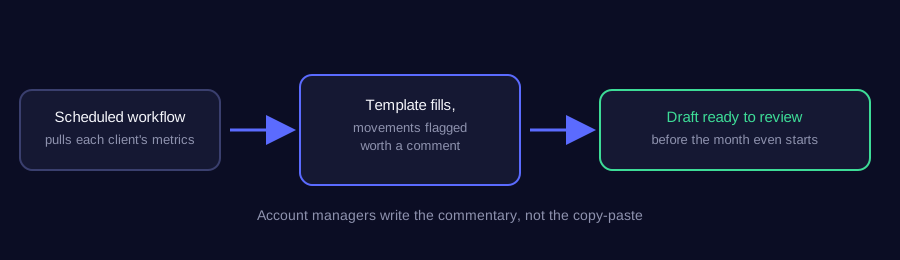
A scheduled workflow pulls each client’s metrics straight from the source platforms on its own, fills the standard report template, and flags the month-over-month movements that are actually worth commenting on. That finished draft lands with the account manager to review and send, rather than a blank template and a stack of exported spreadsheets to start from.
Why the Commentary Stayed a Human Job
The numbers are the easy part to automate reliably. Deciding which movement genuinely matters to a specific client, and explaining why, in a tone that fits the relationship, still needs a person who actually knows that account. Automating the report meant removing the copy-paste, not removing the account manager’s actual judgement about what to say.
Why This Is the Same Problem as Reconciling Ad Data
Reports pulling clean, trustworthy numbers depend on the same discipline behind automating client reporting in general: pull from each platform’s own reporting API directly, rather than a manual export that can drift or go stale between the export and the send. A report is only as trustworthy as the pipeline that fed it.
What the First of the Month Looks Like Now
Reports are ready before anyone has opened a laptop, built from one consistent pipeline instead of five separate manual exports. The two days that used to disappear into copy-paste every month are simply gone, and account managers spend that time on the part of the job that actually needed them in the first place.
Why One Pipeline Beats Five Separate Exports
Before this, five platforms meant five separate places a number could quietly go stale, five separate formats that could drift apart, and five separate chances for a typo to slip into a client-facing document. Consolidating everything through one pipeline did not just save the time spent exporting, it removed most of the actual points where an error could get introduced in the first place, since there is only one place left for a mistake to happen instead of five.
What Happens When a Client Asks a Follow-Up Question
An automated report still has to survive the moment a client emails back asking why a specific number moved. Because every figure traces back to the same live pipeline rather than a static export someone pasted in weeks of drafts ago, the account manager can answer that question by looking at the current data directly, instead of trying to reconstruct which spreadsheet version the original number actually came from.
None of this required replacing the tools the agency already used for analytics or ad reporting. The change was entirely in how the numbers moved from those tools into the client-facing document, not in the tools themselves.
Does this sound like your business?