How to Automate Client Reporting So It Doesn’t Eat the First Two Days of Your Month
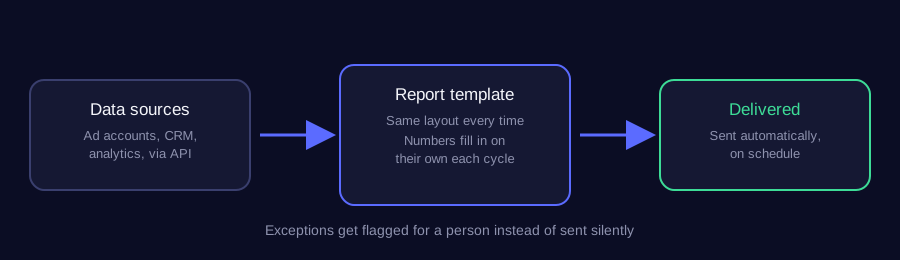
Connect your data sources (ad platforms, CRM, analytics) directly to a report template that pulls fresh numbers automatically, then have it generate and send on a schedule. Most teams can have this running within a week, turning a two-day manual task into something that takes minutes to review.
Does this sound like your business?
Here’s how to automate client reporting so it stops eating far more time than it should. Someone logs into four or five different platforms, copies numbers into a spreadsheet, checks them twice, and builds a report that looks almost the same as last month’s. This guide walks through the automation pattern I use to turn that into something that runs on its own and only needs a quick review before it goes out.
The pattern below works with any reporting destination, a shared Google Sheet, a PDF, or a client-facing dashboard, and any mix of data sources that offer an API.
Why Teams Decide to Automate Client Reporting in the First Place
The honest reason most teams automate client reporting isn’t a data problem, it’s a time problem. The numbers are always available somewhere. What’s missing is the hour someone has to set aside every month to actually go get them, format them the same way as last time, and write something sensible about what changed. That kind of work is easy to postpone and even easier to do slightly differently each time, which is exactly how reports start looking inconsistent from one client to the next.
This is the same problem covered in the case study on client reporting eating two days a month for a marketing agency, worth reading alongside this guide if that two-day estimate sounds familiar.
What Good Automated Reporting Actually Looks Like
A good automated report doesn’t just save time, it removes an entire category of small, embarrassing mistakes: a stale number nobody caught before sending, a client getting last month’s template with this month’s numbers pasted over the wrong row, a metric that quietly stopped tracking three weeks ago and nobody noticed. Pulling numbers straight from each platform’s own reporting API, rather than a manual export, closes most of that gap on its own. Google’s own Analytics Data API documentation is a good example of the kind of direct, scheduled access most reporting platforms now offer.
Where Teams Get Stuck the First Time They Try This
The most common mistake is trying to automate the whole report end to end on the first attempt, including the written commentary. Numbers are the easy part to automate. The one paragraph explaining why a metric moved is usually still worth a person’s attention, at least until the automation has been running long enough to build real trust. A workflow that pulls the numbers automatically and drafts a report for a human to review and send gets almost all of the time savings without asking anyone to trust a fully unattended report on day one.
How This Fits Alongside Other Reporting Tools
Most of this can run on tools a team already pays for. n8n, Zapier or Make handle the scheduling and the platform-to-platform movement of data, a Google Sheet or a simple template handles the layout, and the review step is just someone opening a draft instead of building one from scratch. Nothing about this requires replacing an existing reporting stack, only removing the manual copy-paste layer sitting in the middle of it.
What to Check Before You Trust the Output
The first few reports out of a new automation deserve a closer read than the ones after it, not less. Compare the automated numbers against the platform’s own dashboard directly, not against last month’s manually built report, since a bug in the old process could have been quietly baked into every report before it too. Once a few cycles have run clean against the source platforms themselves, that closer check can relax into a spot-check instead of a full review every time.
-
1
Map every number that actually goes in the report
Before automating anything, list out exactly what gets copied into the report today and where each number comes from. Most reports have a handful of numbers that matter and a lot of formatting around them. Knowing the real list stops the automation from becoming more complex than the report itself.
-
2
Connect each data source directly, not through a spreadsheet someone updates by hand
Pull numbers straight from each platform's API (ad accounts, analytics, CRM) instead of a manual export-and-paste step. This is the change that actually removes the work. A spreadsheet someone updates by hand is still manual work, just moved one step earlier in the process.
-
3
Build the report as a template, not a document edited from scratch each month
Set up one template that the automation fills in with fresh numbers each cycle, whether that is a Google Slides deck, a Sheet, or a PDF layout. The template stays the same. Only the data changes. That is what makes the report consistent from month to month without anyone re-formatting it.
-
4
Automate the delivery, not just the generation
Once the report is built, send it automatically by email or post it to wherever the client actually looks, rather than generating it and leaving someone to remember to send it. A report that is finished but not sent still costs someone a reminder and a few minutes they didn't need to spend.
-
5
Handle exceptions separately from the routine report
If a number looks wrong (an API outage, a tracking gap, a sudden spike) flag it for a human to check instead of sending it silently. The goal is a report that is trustworthy by default, with a person only pulled in when something genuinely needs their judgement.
Does this sound like your business?