How to Route New Website Leads to Sales in Under a Minute
Connect your form submission to a webhook, enrich the lead with a quick lookup (company size, source page), then push it into your CRM and notify the right salesperson by chat, all in one automation with no manual re-typing. Most builds take under a day.
Does this sound like your business?
Most small teams lose leads not because nobody wants to follow up, but because the lead sits in an inbox until someone has time to notice it. This guide walks through the exact automation pattern I use to get a lead from a web form into a salesperson’s hands, with the right context attached, before the visitor has even closed the tab.
The pattern below works with any form tool (Elementor, Gravity Forms, a plain HTML form posting to a webhook) and any CRM with an API or a Zapier/Make/n8n integration.
Why You Need to Route New Website Leads to Sales Immediately
The speed of the first response is one of the few genuinely proven levers in sales, and it is also one of the easiest to fix with automation. A widely cited Harvard Business Review study found that companies contacting a web lead within an hour were dramatically more likely to have a meaningful conversation with a decision-maker than those that waited even slightly longer. The odds drop fast after that first hour. It is worth reading directly: The Short Life of Online Sales Leads.
That is the entire case for why a team needs a system that can route new website leads to sales the moment they arrive, rather than relying on someone checking an inbox on their own schedule. A form submission does not know what time zone your sales team is in, whether they are in a meeting, or whether it is a Friday afternoon. The automation has to know regardless.
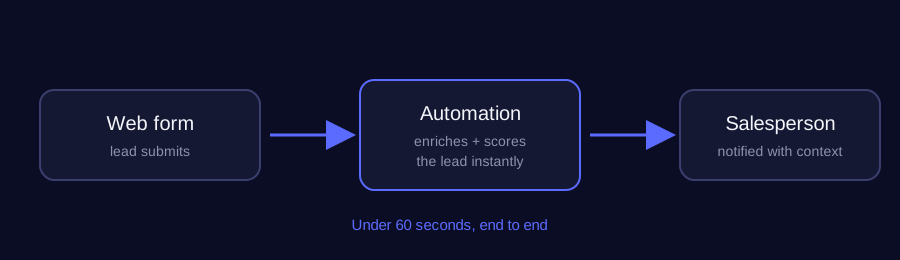
There is a second reason this matters beyond raw speed: context. A lead routed to a salesperson with nothing but a name and an email forces that person to do detective work before they can even open the conversation. The pattern below solves both problems in the same step. The moment a lead is routed, it already carries the page it came from, what was filled in, and anything else the form or CRM knows about it.
Common Mistakes That Slow Down Lead Routing
The most common failure mode is not a missing tool, it is routing rules too rigid to survive real-world edge cases. Patterns worth avoiding: pure round-robin assignment with no regard for whether a rep is actually online, dropping every notification into a single shared inbox (which just recreates the original problem one layer down), and failing to re-check a lead’s status before notifying. That last one causes a rep to get pinged about a lead someone else already claimed in the same minute. A simple “first to acknowledge wins” rule, with a fallback notification if nobody acknowledges within a few minutes, closes almost all of these gaps without adding real complexity.
None of this requires an enterprise CRM or a six-figure sales-ops budget. The pattern below runs comfortably on tools most small teams already have: a web form, a webhook, and whatever CRM or messaging tool the sales team already lives in day to day.
What This Looks Like With Different Toolsets
The exact wiring changes depending on what you already run, but the shape stays the same. If the site runs on a form plugin that supports webhooks, the automation platform picks up the submission the instant it happens. There is no polling and no delay. If leads come in through a CRM instead of a raw form, the trigger becomes a new-record event in that CRM rather than a webhook, but the routing logic downstream is identical: enrich, decide who should get it, notify, and confirm someone has actually picked it up.
The part teams most often skip is the confirmation step. It is easy to build the notification half of this and stop there, but a notification nobody has acknowledged is functionally the same as the inbox problem this whole pattern exists to solve. It just has an extra automation sitting in front of it now. Building in a short timeout and an escalation path if nobody responds is what actually closes the gap, not the initial notification on its own. The same escalation-path idea shows up in a real build that cut a day-late lead response down to two minutes, if you want to see the pattern applied end to end.
Related reading: leads that call and get no answer are lost too, see an automated missed call text back system. To catch the leads nobody picks up in time, see how to build a speed to lead alert system with n8n and Groq.
-
1
Capture the submission as a trigger
Point your form's webhook (or a Zapier/Make/n8n trigger) at the automation instead of just an email notification. This is the single change that unlocks everything else. The moment the form is submitted, your workflow starts.
-
2
Enrich the lead automatically
Before it ever reaches a human, look up anything useful: company size from the email domain, which page they were on, UTM source. A few seconds of enrichment here saves the salesperson minutes of digging later.
-
3
Push it into the CRM as a real record
Create (or update, if the email already exists) a contact and a deal in the CRM via its API. That replaces a spreadsheet row someone would otherwise have to copy in later.
-
4
Route it to the right person
Use a simple rule (territory, deal size, round-robin) to decide who owns it, then post a message straight to that person's Slack/Teams with the lead's details and a link to the CRM record.
-
5
Confirm receipt to the visitor
Send an automatic confirmation email so the visitor knows it was received. This alone reduces the 'did that even go through?' follow-up messages.
Does this sound like your business?