How to Automate Facebook Comment Replies With n8n and Gemini
Facebook Page comments either go unanswered for hours because nobody is watching the thread in real time, or a blanket auto-responder replies to everything including obvious spam and bot comments, which just encourages more of them. There is also no running record of what visitors actually asked, since comments only live inside Facebook itself.
Does this sound like your business?
- Genuine comments get a reply that actually references what was said, usually within minutes of the next scheduled run
- Spam and bot-like comments are logged but never get a public reply, so the Page does not train more bots to comment
- Every comment is logged to a running Google Sheet automatically, positive, question, negative, or spam
- The workflow never replies to its own comments, so there is no risk of a reply loop
A Facebook Page’s comment section is usually the first place a real prospect asks a question, and also the first place a bot drops a scam link. Most Pages either reply to everything by hand, hours later, or ignore comments entirely and let a genuine question sit unanswered next to spam. I built a real n8n agent that watches this site’s own Facebook Page, drafts a genuine reply to every new comment with Gemini, and automate Facebook comment replies without ever replying to junk. This is exactly how it works, tested against real comments on a live post, not simulated data. The real, tested workflow file is free to download near the bottom of this page.
Who Is This For
This workflow is built for Page admins, agencies, and small business owners who post regularly on Facebook but cannot realistically watch every comment thread in real time.
It fits anyone who wants a genuine first reply within minutes on real comments, while spam and bot noise get logged instead of fed with a reply.
What Problem Does This Workflow Solve
- Comments Go Unanswered: A real question sits under a post for hours or days because nobody is watching the thread.
- Spam Gets Replies It Does Not Deserve: A generic auto-responder replies to everything, including bot comments, which just encourages more of them.
- No Record of What Was Said: Comments live only on Facebook itself, with no running log anyone can review later.
How to Automate Facebook Comment Replies With n8n and Gemini
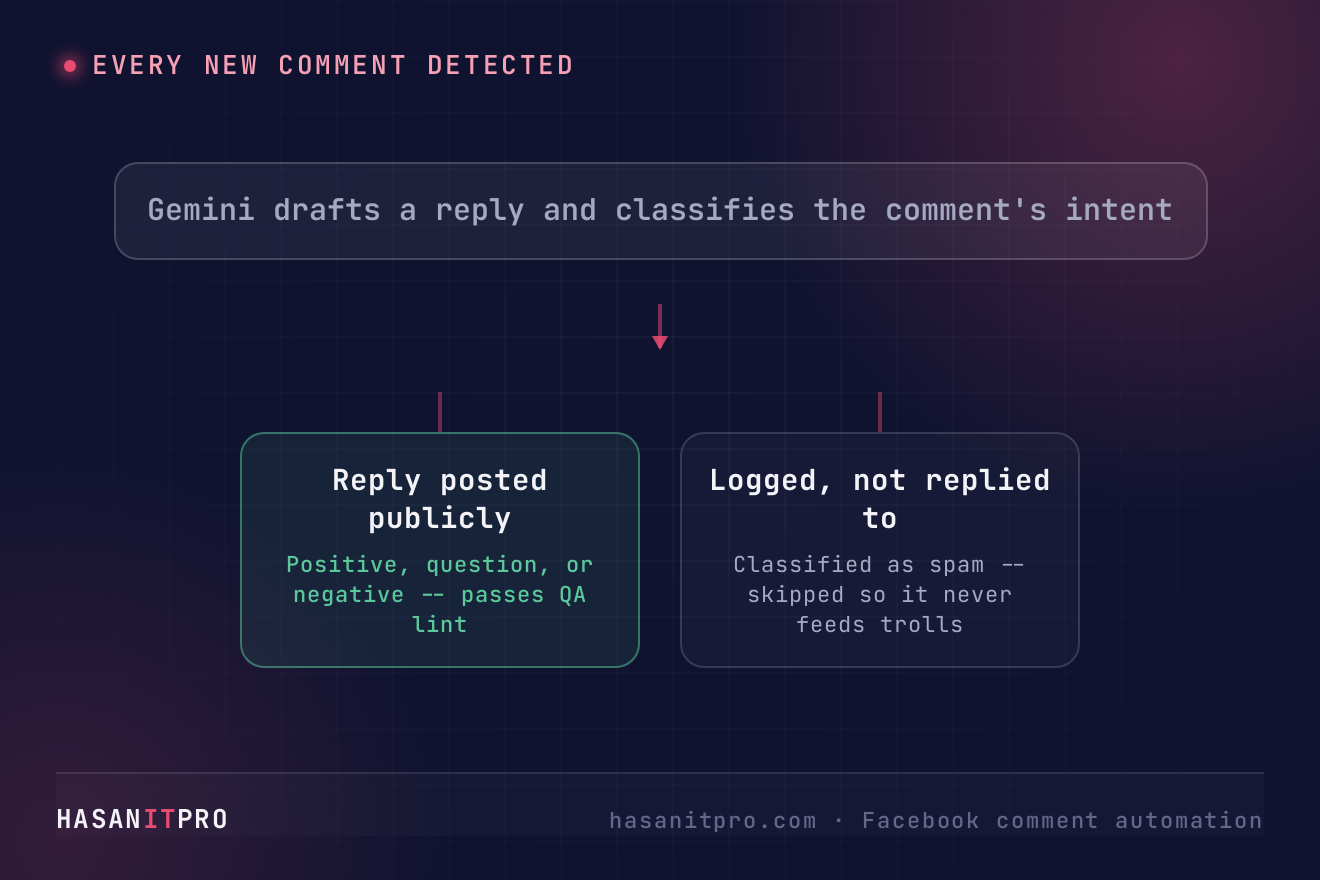
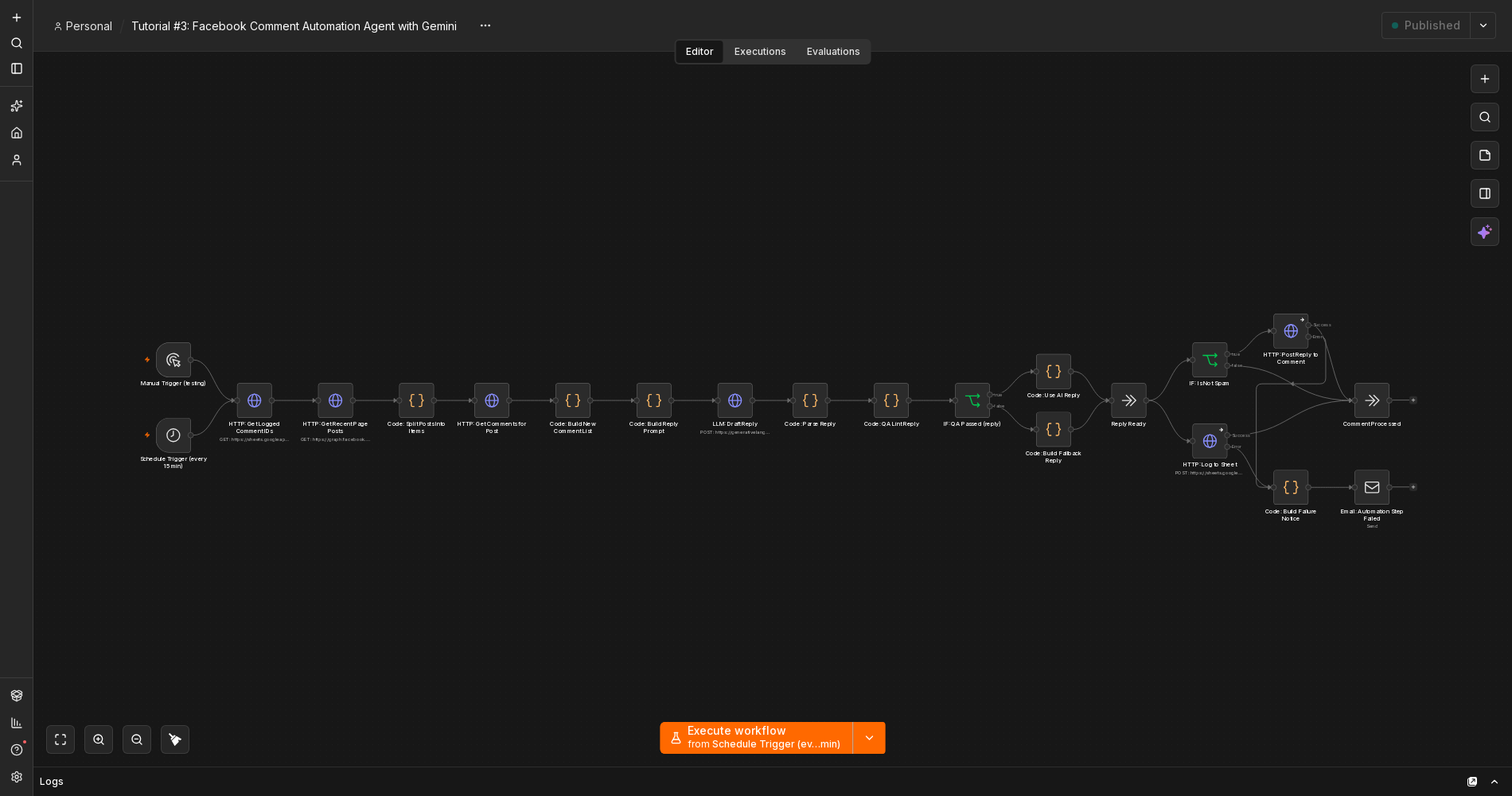
The pipeline has four real stages: pull comments from the last few Page posts and filter out anything already handled or posted by the Page itself, ask Gemini to draft a reply and classify the comment’s intent in the same call, QA-lint the draft and fall back to a safe reply if it fails, then post the reply and log the comment in parallel, skipping the public reply entirely when the comment is spam. See my contact form auto-reply build for the closely related pattern this one grew out of, using the same QA-lint and fallback approach against a different real trigger. This build runs on a schedule instead of a webhook, since Facebook comments do not arrive the way a form submission does.
The Real Dead End This Build Actually Hit
Getting a working Facebook credential took two genuine failures, not a guess. The Page’s existing access token, already used elsewhere on this site to publish real posts, turned out to lack the specific permission needed to write a comment reply. Every read call worked. The write call failed with a plain Meta permissions error.
Regenerating the token did not fix it. The same write call failed again, with the identical error. Meta’s own Graph API Access Token Debugger tool showed why: the new token was a User access token, not a Page access token. It had the right permission listed, just attached to the wrong kind of token for acting as the Page. The actual fix was a token exchange call using the user token to fetch the Page’s own token, and using that value instead. Neither failure was guessed at. Both showed up as real, structured error responses from Meta’s own API on a real Page.
Setup Guide
Prerequisites
- A Facebook Page you manage, with a Page access token that includes the pages_manage_engagement permission
- A Google Gemini API key
- A Google account with Sheets access
- A hosted instance of n8n (cloud or self-hosted)
Setup Steps
- Download the workflow file near the bottom of this page and import it into your n8n instance.
- Get a real Page access token, not a User token, with pages_manage_engagement, pages_read_engagement, and pages_show_list.
- Connect your credentials for the Page token, Gemini, and Google Sheets.
- Set your Page ID in the two HTTP nodes that call the Graph API.
- Activate the workflow so the Schedule Trigger starts polling for real.
- Test with the Manual Trigger against a real comment on a real post, then check the execution log and the Sheet before trusting it on autopilot.
How to Customize This Workflow
- Change the polling interval from 15 minutes to whatever matches how active your Page actually is.
- Adjust the spam definition in the prompt if your Page’s real spam pattern looks different from generic bot comments.
- Log to a CRM or Airtable instead of Google Sheets, the same append pattern works against either.
- Add a human-approval step before the reply posts, if you would rather review AI replies before they go public.
- Point it at more posts by raising the limit on the Get Recent Page Posts call.
Related reading: running this on your own server? See how to self-host n8n. To make sure a failed step never goes unnoticed, read how to handle errors in n8n workflows. If Google Sheets keeps asking you to reconnect, here is the permanent fix for a Google credential that keeps needing to be reconnected.
Need Help Customizing?
Connect with me on LinkedIn, or find more real builds on YouTube, Facebook, and Instagram.
Read the six steps in full below, or download the real, tested workflow file to import directly into your own n8n and automate Facebook comment replies on your own Page.
-
1
Get a Real Page Access Token, Not a User Token
- Generate a token with pages_manage_engagement, pages_read_engagement, and pages_show_list -- reading works with less, but posting a reply needs pages_manage_engagement specifically.
- Check the token type in Meta's Access Token Debugger before wiring it into n8n. A User token can show the right permission in its scope list and still fail to post as the Page.
- If you have a User token, exchange it for the Page token with a single call: GET /{page-id}?fields=access_token, authenticated with the user token.
- Store the resulting Page token as an httpQueryAuth credential in n8n.
-
2
Poll Recent Posts and Find Genuinely New Comments
- On a Schedule Trigger, fetch the last few posts from the Page, then fetch comments on each one.
- Read back the comment IDs already logged in your Sheet and filter those out, so a comment only ever gets processed once.
- Filter out any comment authored by the Page itself. Without this, the workflow would eventually try to reply to its own replies.
- A Manual Trigger wired into the same first node lets you test on demand instead of waiting for the schedule.
-
3
Draft the Reply and Classify Intent in One Gemini Call
- Build a prompt that hands Gemini the original post's text and the comment itself.
- Ask for a single JSON response containing the reply text and an intent classification: positive, question, negative, or spam.
- Explicitly tell Gemini never to quote a price and never to invent a detail the commenter did not actually mention.
- Classifying intent in the same call as drafting the reply avoids a second, separate model call just to decide whether to post it.
-
4
QA-Lint the Draft and Fall Back Safely If It Fails
- Run the same banned-word and em-dash checks used elsewhere on this site against the drafted reply.
- Route a failed check to a small Code node that returns a safe, generic reply instead of posting nothing or blocking the run.
- Branch on an IF node comparing the error count to zero, true routes to the AI draft, false routes to the fallback.
- Both branches converge back into the same shape before the next step, so nothing downstream needs to know which one actually ran.
-
5
Post the Reply and Log the Comment, in Parallel, Skipping Spam
- Real bug carried over from an earlier build: chaining a reply-posting HTTP node directly into a Sheets-logging node loses the original comment data, since the first node's response becomes the new payload.
- Fan both the reply-posting call and the Sheets-append call out from one shared node instead of chaining them, so each one reads the same original data.
- Gate the reply-posting call behind an IF node checking the intent is not spam. The Sheets log runs regardless, so spam still gets recorded, just never gets a public reply.
-
6
Handle Failures and Test It for Real Before You Trust It
- Set onError to continue using error output on both the reply-posting and Sheets-logging nodes, so one failing step does not kill the whole run.
- Route any error output to a Code node that builds a plain internal alert naming the exact comment and post, then a real email to whoever manages the Page.
- Test against a real comment you post yourself first, not a hand-built payload, then check the actual n8n execution and read the Sheet row back to confirm it logged correctly.
- Only after a real comment gets a real, on-topic reply posted successfully should you trust the Schedule Trigger to run it unattended.
This is the real, tested n8n workflow from this tutorial, not a mockup. Tell me where to send it and it'll land in your inbox as a ready-to-import .json file.
Does this sound like your business?